
Siemens TIA Portal Programming Basics: A Practical Guide for Engineers
What if you could master Siemens TIA Portal without paying the full “Australia tax” on S7 hardware?
It’s a common problem for Australian engineers. You’re staring at the complex TIA Portal interface, trying to understand the confusing block architecture of OBs, FCs, and FBs, all while the high cost of official S7-1200 or S7-1500 PLCs makes getting hands-on practice a major A$ investment. Learning the siemens tia portal programming basics shouldn’t be this difficult or expensive.
This practical guide cuts through the noise. We give you the essential skills to configure hardware, navigate the software, and write your first PLC program efficiently. You’ll walk away from this guide ready to deploy a simple, effective S7 PLC program. Get ready to finally understand the core differences between program blocks and, most importantly, learn how to source the Siemens components you need at a much lower price. No more paying massive markups; just the hardware and knowledge you need to get the job done.
Key Takeaways
- Discover how TIA Portal’s unified environment for PLCs, HMIs, and drives streamlines your workflow and reduces engineering time.
- Learn the essential siemens tia portal programming basics, from creating your first project and configuring hardware to assigning device IP addresses.
- Select the correct PLC for your application by understanding the key differences between the cost-effective S7-1200 and the high-performance S7-1500.
- Optimise your project costs by learning how Australian engineers use parallel importing to access genuine Siemens components at lower prices.
What is Siemens TIA Portal and why is it the industry standard?
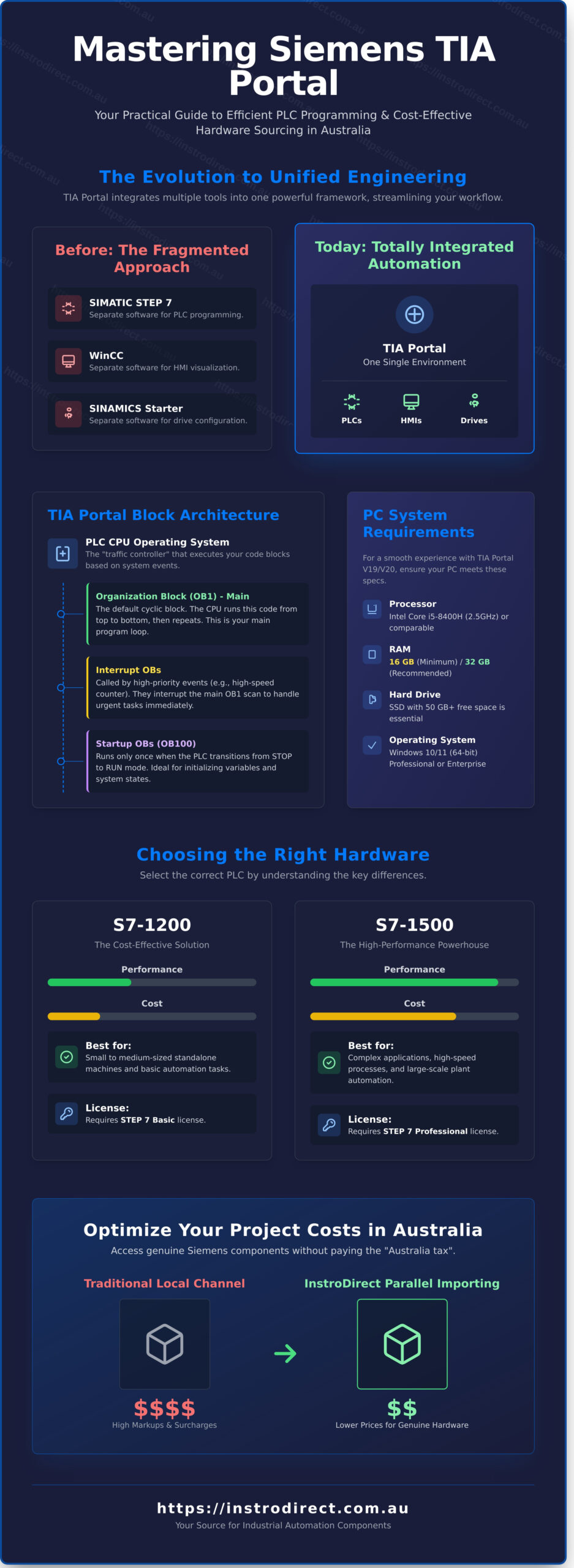
Siemens TIA (Totally Integrated Automation) Portal is a unified engineering framework. It’s not just another piece of software; it’s the central nervous system for modern Siemens automation projects. Before TIA Portal, you needed separate software for different tasks: one for your PLC, another for your HMI, and yet another for your drives. This created data silos and wasted time. TIA Portal fixes this. It combines all configuration, programming, and diagnostics into a single, intuitive environment.
The core benefit is efficiency. You get one project file for your entire system. This includes controllers from the powerful Siemens SIMATIC family, HMI panels, and SINAMICS drives. The software supports the full range of modern controllers, including the S7-1200, S7-1500, and legacy S7-300 and S7-400 series. For any engineer or technician in Australia, mastering the siemens tia portal programming basics is no longer optional; it’s a fundamental skill for reducing project delivery times and operational costs. Centralised data management means a change made in the PLC logic can be automatically updated in the HMI visualisation, eliminating errors and saving hours of rework.
The evolution of STEP 7 to TIA Portal
The move from the classic SIMATIC STEP 7 (V5.x) to TIA Portal was a major leap. While STEP 7 was a robust tool, it operated in a fragmented environment alongside other software like WinCC for HMIs. TIA Portal integrates these functions into one interface. This transition delivered major upgrades, including a drag-and-drop hardware configurator and vastly improved network diagnostics that visualise your entire system topology. Critical functions like safety (Safety Advanced) and motion control are now part of the same project, not complex add-ons.
System requirements for TIA Portal V19/V20
Running TIA Portal smoothly requires a capable PC. Don’t try to run it on old hardware; you’ll waste more time waiting than working. For the latest versions (V19/V20 as of late 2024), your machine needs to meet these minimum specifications. Meeting the recommended specs will deliver a much better user experience.
- Processor: Intel® Core™ i5-8400H (2.5 GHz) or comparable. A faster processor directly impacts compile times.
- RAM: 16 GB is the absolute minimum. For medium to large projects, 32 GB is strongly recommended to avoid performance bottlenecks.
- Operating System: Windows 10 (64-bit) Version 22H2 or Windows 11 (64-bit) Version 22H2. Professional or Enterprise editions are required.
- Hard Drive: A Solid State Drive (SSD) with at least 50 GB of free space is essential for fast program loading.
Your license type is also critical. A STEP 7 Basic license only allows programming of the S7-1200 series controllers. For access to the full range, including the powerful S7-1500, S7-300, and S7-400 PLCs, you need a STEP 7 Professional license. Choose the license that matches your hardware and project scope to avoid unnecessary costs.
Understanding the TIA Portal Block Architecture
Siemens TIA Portal doesn’t use a single, massive file of code. Instead, it uses a modular, block-based structure. This is one of the most important siemens tia portal programming basics to grasp. This architecture is deliberate; it forces a clean, organized approach that makes complex automation projects scalable, easier to troubleshoot, and simpler to maintain. The PLC’s CPU operating system acts as a traffic controller, executing these blocks in a precise order to ensure your machine runs predictably.
This structure also dictates how memory is managed. Data can be stored locally within a block (temporary) or globally where any part of the program can access it (permanent). Mastering this concept is the key to writing efficient code that doesn’t waste the CPU’s limited resources. A well-organized project with a logical block structure can reduce troubleshooting time by over 50% compared to a poorly structured one.
Organization Blocks (OBs): The Program Entry Points
Think of OBs as the scheduled appointments for your code. The CPU’s operating system calls them automatically based on specific events. You don’t call an OB; the system does.
- Main OB (OB1): This is the default cyclic block. The CPU runs through the code in OB1 from top to bottom, then repeats, creating the “scan cycle.” A typical cycle for an S7-1200 involves: reading physical inputs, executing OB1 logic, and then writing to physical outputs, often completing in under 10 milliseconds.
- Interrupt OBs: These blocks interrupt the main scan cycle to handle urgent tasks. A hardware interrupt from a high-speed counter or a time-of-day interrupt for a scheduled batch process are common uses. They ensure critical events are never missed.
- Startup OBs (OB100): This block runs only once when the PLC transitions from STOP to RUN mode. It’s the perfect place to initialize machine parameters, set counters to zero, and home axes before the main program takes over.
Functions (FCs) vs Function Blocks (FBs)
The choice between using an FC or an FB is fundamental to reusable code. Choosing the wrong one leads to messy, inefficient programs.
- Functions (FCs): An FC is stateless logic. It has no memory of its own. You provide inputs, it performs a calculation, and it provides outputs. It’s perfect for repeatable mathematical conversions, like converting a raw sensor value to an engineering unit (e.g., 4-20mA to 0-100 PSI).
- Function Blocks (FBs): An FB is stateful logic. It has its own memory, called an Instance Data Block (iDB). This allows it to remember its state between scans. An FB is essential for controlling anything that has a state, like a motor (On/Off/Faulted) or a valve (Open/Closed). You can reuse the same FB for every motor in your project, and each will have its own iDB to track its unique status.
Using FBs for all your standard devices is a core principle of efficient programming. Ensuring you have the right Siemens S7-1200 or S7-1500 CPU is the first step; you can find competitive pricing on Siemens hardware to match your project’s scale and memory requirements.
Data Blocks (DBs) and User Data Types (UDTs)
Data Blocks are simply containers for your project’s data. They are the memory and filing system of your PLC program.
- Global DBs: These hold information that needs to be accessible from anywhere in the program. Think machine recipes, configuration settings, or system-wide status flags.
- User Data Types (UDTs): A UDT is a custom data template. Instead of creating individual tags for a motor (e.g., Motor1_Start, Motor1_Stop, Motor1_Running), you can create a single UDT called “udt_Motor” that contains all those tags. Then, you can create a variable of that type for each motor. This keeps data perfectly organized and is essential for managing large projects.
- Optimized vs. Non-optimized Access: Modern S7-1200 and S7-1500 PLCs use “Optimized” block access by default. This allows the system to arrange data internally for the fastest possible access, removing the need for old-style absolute addressing. The official Siemens programming guideline strongly recommends this approach as it provides significant performance gains and reduces the chance of memory overlap errors.
Choosing the Right Hardware: S7-1200 vs S7-1500
Selecting the right PLC is the first critical step in any automation project. Your choice between a Siemens S7-1200 and an S7-1500 will define your project’s budget, capabilities, and future scalability. Understanding the hardware is a core component of the siemens tia portal programming basics. One is a compact controller built for value; the other is a high-performance machine for complex tasks. Let’s break down the differences.
S7-1200 Features and Limitations
The S7-1200 is the workhorse for small to mid-range automation. It’s designed to be a cost-effective, all-in-one solution. Most CPUs come with integrated I/O and at least one PROFINET port built-in, saving you money on extra communication modules for simple networks. With work memory typically ranging from 50 KB to 150 KB and processing speeds for bit instructions around 0.08 microseconds, it has enough power for standalone machines. Think packaging equipment, pump controls, or small conveyor systems. It’s the top choice for OEM builders who need reliable control without a massive price tag.
S7-1500 Performance and Scalability
Need more power? Get the S7-1500. This controller is built for complex, high-speed applications where performance is non-negotiable. A key advantage is the built-in display screen on the CPU, allowing for quick diagnostics and network address changes without needing a laptop. This saves valuable time on the plant floor. The S7-1500 platform supports huge I/O counts and offers significantly faster processing, with some high-end CPUs executing bit instructions in under 1 nanosecond. Its real power lies in advanced features like Technology Objects for integrated motion control. For large-scale Australian operations, it competes directly with platforms like Allen-Bradley ControlLogix. To properly leverage these capabilities, your code must be structured and efficient. Following the official Siemens S7-1200/1500 Programming Guidelines is essential for building robust applications.
Where to buy Siemens PLCs in Australia
Avoid the traditional distributor markup. In Australia, authorised channels can add a significant percentage to the manufacturer’s price. The solution is parallel importing. We source 100% genuine, factory-sealed Siemens hardware from the global supply chain to bypass this local markup, passing the savings directly to you. For critical infrastructure, you can’t risk using refurbished or questionable parts. We ONLY supply new hardware, ensuring reliability for your plant.
Get the PLC you need at a better price. We offer direct shipping from our warehouse in Narangba, QLD, with local support ready to help. SAVE BIG on your next project. Can’t find the specific CPU or I/O module you’re looking for? CONTACT US DIRECTLY. WE ARE HERE TO HELP.
How to Create Your First TIA Portal Project
Theory is done. It’s time to build. This section walks you through the essential steps, from a blank screen to running code. Follow this process to understand the core workflow of TIA Portal and get your first program operational fast.
First, launch TIA Portal and select ‘Create new project’. Give it a descriptive name like ‘Motor_Control_Test_V1’. The next critical step is adding a device. You must select the exact CPU part number you are using. For an S7-1200, this looks like 6ES7214-1AG40-0XB0. If this number is wrong, your project will not download to the hardware. Check the side of your physical PLC to confirm the part number before proceeding. This is one of the most common beginner mistakes.
Hardware Configuration and Networking
In the ‘Device view’, you’ll see a virtual rack. The Hardware Catalog on the right contains all compatible modules. Drag and drop digital input (DI) or analog output (AQ) modules onto the rail to match your physical setup. For network setup, double-click the CPU’s PROFINET port. Here you can assign a static IP address, like 192.168.0.1, with a subnet mask of 255.255.255.0. Every device on your network needs a unique IP. Need the correct Siemens CPU or I/O modules? Find deals on all Siemens S7 series hardware at InstroDirect.
Basic Programming Languages: LAD, FBD, and SCL
TIA Portal supports several languages, but for siemens tia portal programming basics, you’ll likely start with one of these three:
- Ladder Diagram (LAD): The most common language. It mimics electrical relay circuits, making it easy for electricians and technicians to read. Best for discrete on/off logic.
- Function Block Diagram (FBD): A graphical language that shows logic flow through blocks. It’s excellent for process control where signals pass through various functions.
- Structured Control Language (SCL): A high-level, text-based language similar to Pascal. Use SCL for complex algorithms, loops, and advanced math that would be clumsy in LAD or FBD.
For your first project, stick with LAD. Navigate to ‘Program blocks’ and open ‘Main [OB1]’. This is the Organization Block that the PLC scans continuously. Here, you’ll write a simple circuit. Drag a ‘Normally open contact’ instruction onto Network 1 and assign it the tag ‘Start_Button’ (address %I0.0). Then, add a ‘Coil’ and tag it ‘Motor_Output’ (address %Q0.0). This simple line of code means: if the start button is pressed, turn on the motor output.
With your logic written, click the ‘Compile’ icon. The goal is “0 Errors, 0 Warnings”. Errors will prevent a download; warnings should be reviewed but won’t stop you. Next, click ‘Download to device’. You can choose your physical PLC or PLCSIM, Siemens’ built-in simulator. Using PLCSIM is a cost-free way to test your code without any hardware, a standard practice for projects under A$5,000 to reduce bench testing costs.
Once downloaded, click the ‘Monitoring on/off’ icon (it looks like a pair of glasses). You can now see the logic execute in real-time. Live power flow is shown in green. If ‘Start_Button’ is true, the line to ‘Motor_Output’ will turn green, and the coil will activate. This live feedback is essential for debugging and confirming your program works as expected. Mastering this monitoring view is a core skill for all siemens tia portal programming basics.
Optimizing Your Automation Costs with InstroDirect
Mastering the siemens tia portal programming basics is only half the battle. The other half is sourcing genuine, reliable hardware without destroying your project budget. For Australian engineers, system integrators, and maintenance managers, long lead times and high local prices from official distributors can cripple productivity and profitability. This is where a smarter sourcing strategy becomes essential.
InstroDirect leverages parallel importing to give you direct access to the global market. We procure 100% genuine Siemens and Rockwell components from international suppliers and pass the savings directly to you. It’s not a workaround; it’s a direct-to-market advantage that cuts out layers of markups. Your project gets the exact same factory-sealed hardware, but your budget goes significantly further.
This isn’t just about saving money. It’s about operational efficiency. With our Queensland-based warehouse, we provide fast shipping across Australia. That means less downtime waiting for a critical VSD or PLC module to arrive from overseas. When a production line is down, every hour costs money. We get you the parts you need, faster.
Save on Siemens and Rockwell Hardware
Get the best prices on the brands you trust. We offer major discounts on essential automation hardware, allowing you to SAVE OVER 40% from manufacturer RRP on selected items. Get direct access to components like Allen Bradley PowerFlex drives or the Siemens S7 PLCs you need for your TIA Portal projects. For large-scale system builds or plant upgrades, contact our team to request a competitive quote for your bulk project requirements.
Our expert technical support team is here to help you get the right part, first time. If you have a functional requirement but are unsure of the exact part number, our specialists can assist. We speak your language and understand the critical nature of finding the correct component to interface with your existing systems. This service reduces ordering errors and ensures compatibility, saving you both time and money. We provide practical support for the real-world challenges you face.
Our supply chain is built for the demanding conditions of Australian industry. We understand the urgency required in sectors like mining, manufacturing, and food and beverage processing. Our inventory and sourcing capabilities are tailored to these environments, focusing on robust and reliable components that can withstand harsh conditions. Key benefits of partnering with us include:
- Significant Cost Reduction: Access global pricing on genuine components.
- Minimized Downtime: Fast, reliable shipping from our Australian warehouse.
- Expert Sourcing: Leverage our network to find the exact parts you need.
- 100% Genuine Products: All components are new and in original factory packaging.
Contact InstroDirect for Sourcing Support
Can’t find a specific part number on our website? Don’t worry. We specialize in sourcing hard-to-find and legacy industrial components through our extensive global network. Our team is dedicated to supporting Australian manufacturing and mining with a reliable supply chain for critical parts. If you can’t find what you’re looking for, contact us directly. WE ARE HERE TO HELP.
Master the Basics and Build Your Next Project
You’ve now walked through the essential first steps. You understand why TIA Portal is the industry standard, how its block architecture works, and how to choose between an S7-1200 and an S7-1500 for your specific application. Creating your first project is no longer a theoretical exercise. With these siemens tia portal programming basics mastered, you’re ready to move from the screen to the control panel.
Putting that knowledge into practice requires the right hardware at the right price. That’s where InstroDirect gives you a competitive edge. We slash project costs by providing 100% genuine, new Siemens hardware through our direct parallel import model. Forget paying full manufacturer RRP. You get the exact PLCs and modules you need, all backed by our dedicated Australian-based support team and fast local shipping.
SAVE OVER 40% ON GENUINE AUTOMATION HARDWARE – SHOP NOW
Your next efficient, cost-effective automation project is waiting. It’s time to build it.
Frequently Asked Questions About TIA Portal
Is TIA Portal free to download?
No, the full versions of TIA Portal are not free. Siemens provides a 21-day trial license for TIA Portal Professional, which gives you full functionality to test the software. After the trial period expires, a permanent license is required. These licenses can represent a significant investment, often costing upwards of A$5,000 depending on the specific software package you need for your project.
What is the difference between TIA Portal Basic and Professional?
The primary difference is hardware support and functionality. STEP 7 Basic is designed exclusively for programming the SIMATIC S7-1200 series of controllers and configuring Siemens Basic HMI Panels. STEP 7 Professional supports the entire range of SIMATIC controllers, including the S7-1200, S7-1500, S7-300, and S7-400 series. Professional also includes more advanced programming languages like SCL (Structured Control Language).
Can I program an S7-1200 with TIA Portal Professional?
Yes, you can absolutely program an S7-1200 PLC using TIA Portal Professional. The Professional version is a superset of the Basic version. It contains all the tools and functions needed for the S7-1200, plus the additional capabilities required for the more powerful S7-1500, S7-300, and S7-400 controller families. If you plan to work with a mix of Siemens PLCs, Professional is the required choice.
How do I communicate with a Siemens PLC over Ethernet?
First, connect your computer to the PLC’s PROFINET (Ethernet) port with a standard Ethernet cable. Next, configure your computer’s network adapter to be on the same subnet as the PLC. For example, if the PLC’s IP address is 192.168.0.1, set your computer’s IP to 192.168.0.10. In TIA Portal, use the “Go online” function and select your network card to scan for and connect to the device.
What is PLCSIM and do I need it for learning?
PLCSIM is a software tool that simulates a Siemens PLC controller on your computer. You don’t strictly need it if you have physical hardware, but it’s highly recommended for learning. PLCSIM allows you to download, test, and debug your code without any risk to real equipment. It’s a powerful, cost-effective way to practice the siemens tia portal programming basics before deploying your program to a live system.
Can I use TIA Portal to program Allen-Bradley PLCs?
No, you cannot. TIA Portal is the integrated engineering software exclusively for the Siemens SIMATIC family of PLCs and HMIs. Allen-Bradley PLCs, which are manufactured by Rockwell Automation, require their own proprietary software suite. For modern Allen-Bradley controllers like the ControlLogix and CompactLogix series, you would need to use Studio 5000 Logix Designer software.
How do I update the firmware on my Siemens S7 PLC?
To update the firmware, first download the correct firmware file for your specific PLC model from the Siemens Industry Online Support (SIOS) website. Transfer this file onto a genuine Siemens Memory Card. Then, power off the PLC, insert the memory card, and power the PLC back on. The PLC’s STOP LED will flash to show the update is in progress and will turn solid once the update is complete.
Where can I find cheap Siemens PLC hardware in Australia?
For the best prices on Siemens PLC hardware in Australia, use a parallel importer like InstroDirect. We source new and surplus automation stock globally, allowing us to offer amazing deals that can save you over 40% from the manufacturer’s RRP. Whether you need an S7-1200 starter kit for training or specific modules for a project, we provide a cost-effective alternative to official distributors. Cant find it? Ring us.
Related posts
Emergency Industrial Parts Supplier: Reducing Downtime in 2026
That 12-week lead time from your authorised distributor isn’t just an inconvenience. For a production line losing A$10,000 an hour, it’s a potential…
PLC vs DCS — What Is the Difference?
Programmable Logic Controllers (PLCs) and Distributed Control Systems (DCS) are both used to automate industrial processes, but they evolved from
Siemens TIA Portal Introduction Guide for Australian Engineers
Siemens TIA Portal (Totally Integrated Automation Portal) is the unified engineering software platform for Siemens S7 PLCs, HMIs and drives.
PLC vs DCS — What Is the Difference?
Programmable Logic Controllers (PLCs) and Distributed Control Systems (DCS) are both used to automate industrial processes, but they evolved from
How to Program an Allen-Bradley PLC — Getting Started
Allen-Bradley PLCs from Rockwell Automation are among the most widely used programmable logic controllers in Australian industry. This guide provides
Leave a Comment
Your email address will not be published. Required fields are marked *