
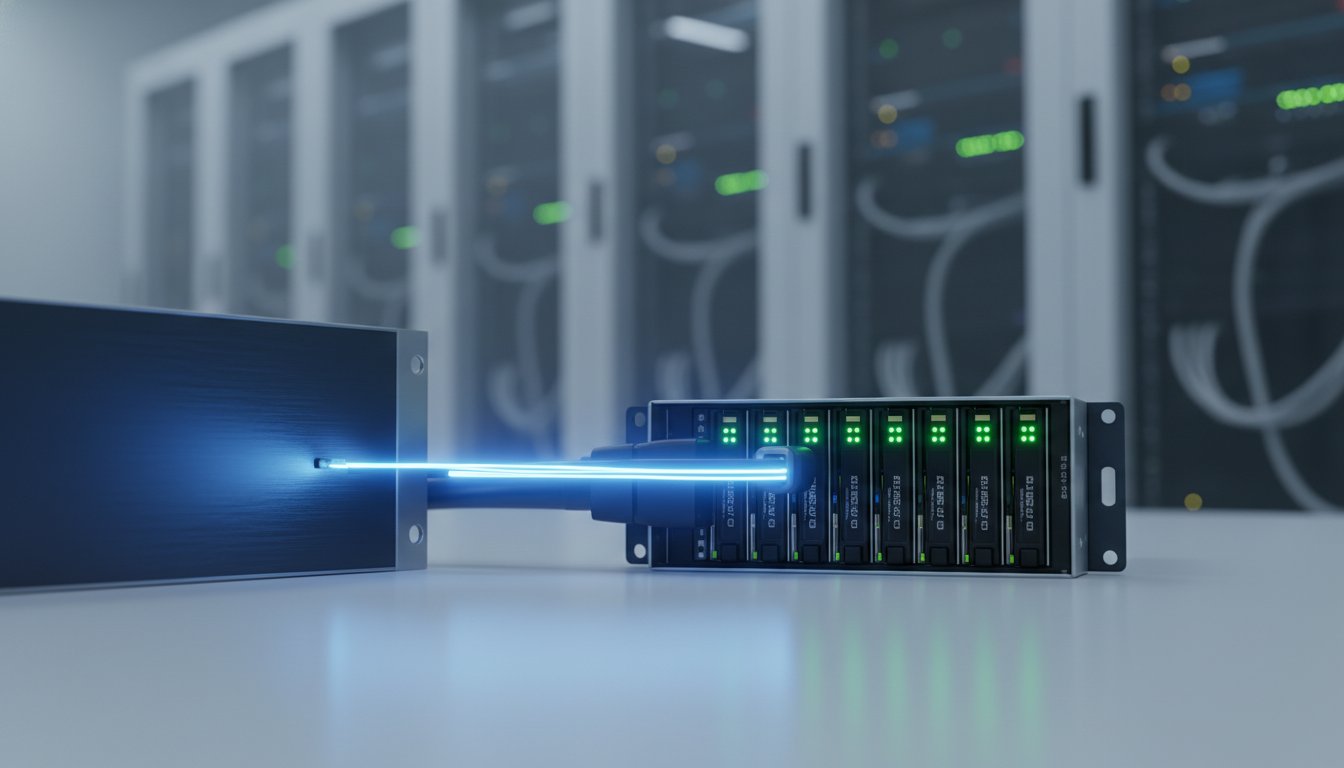
Tired of complex network storage? NAS and SAN systems add unnecessary cost and latency when you just need to expand storage for a single server or industrial PC. Don’t overcomplicate it. For raw speed and a simple, direct setup, the answer is DAS storage. This is the most efficient and cost-effective way to add high-performance capacity right where you need it, eliminating network bottlenecks that slow down critical operations.
This practical guide cuts through the noise. We get straight to the point: what DAS is, how it stacks up against NAS and SAN, and where it delivers the best value in your industrial environment. Stop wasting time and money on the wrong solution. Learn how to confidently identify the key applications for DAS and understand the components you need to build a reliable, high-speed system. Get the job done faster, for less.
What is DAS (Direct-Attached Storage)? The Fundamentals Explained
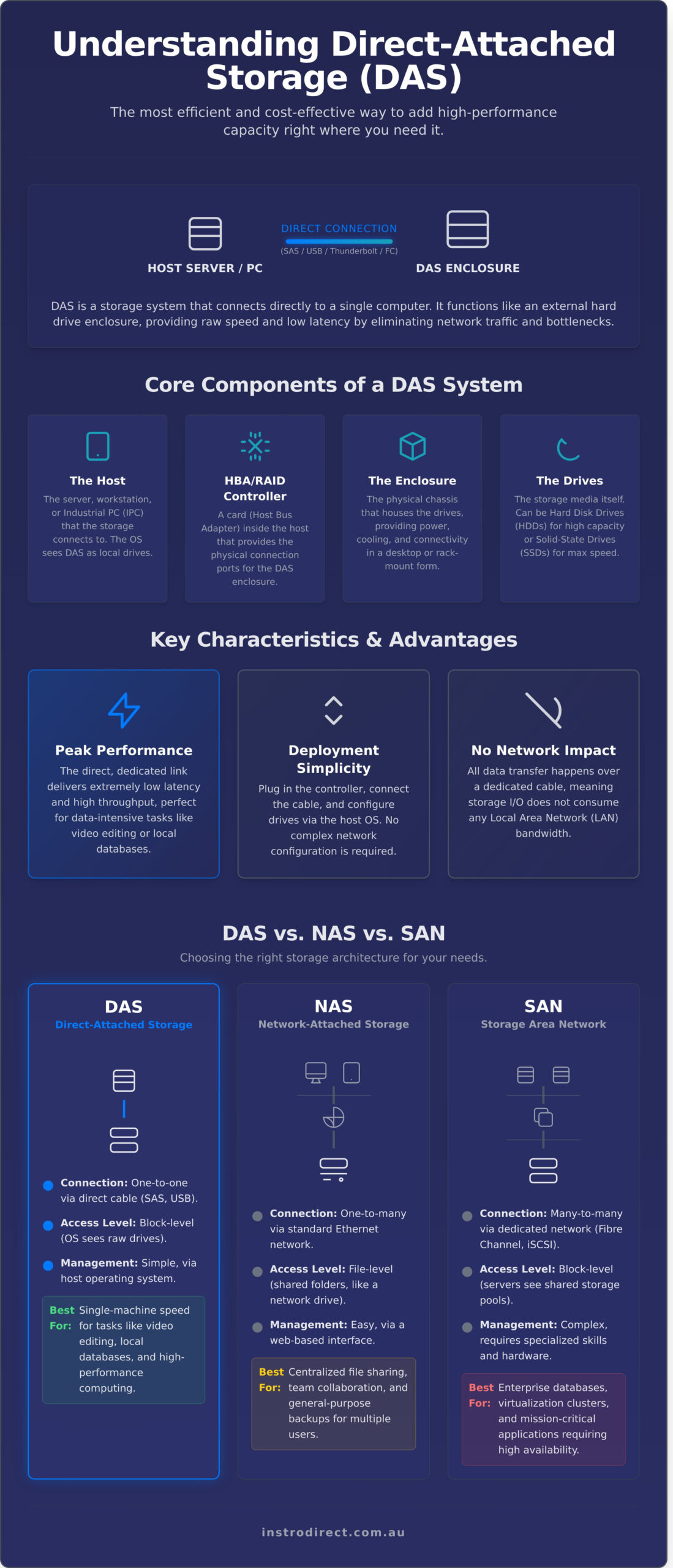
At its core, Direct-Attached Storage (DAS) is a digital storage system that connects directly to a single computer, server, or workstation. Unlike network-based storage, it doesn’t use an Ethernet network for data access. Think of it like adding more internal hard drives to your computer, but they live in a separate, external box. This direct-to-host connection is the defining feature of das storage, guaranteeing high speeds and low latency because data doesn’t have to compete with other network traffic. For a technical deep-dive, the Direct-Attached Storage (DAS) Wikipedia entry provides a comprehensive overview.
Understanding the components and characteristics is key to deciding if it’s the right solution for your needs.
The Core Components of a DAS System
A typical DAS solution is built from four key parts working together to deliver reliable, high-speed storage:
- The Host: The server, workstation, or Industrial PC (IPC) that the storage is connected to. The host’s operating system sees the DAS unit as local storage.
- The HBA/RAID Controller: A Host Bus Adapter (HBA) or RAID controller card installed in the host. This card provides the physical connection ports for the storage enclosure.
- The Enclosure: The physical chassis that houses the drives, providing power and cooling. This can range from a small desktop box to a large, rack-mounted unit.
- The Drives: The actual storage media, which can be traditional Hard Disk Drives (HDDs) for capacity or high-speed Solid-State Drives (SSDs) for performance.
How DAS Connects: Key Interfaces
The connection between the host and the DAS enclosure is critical for performance. Common interfaces include:
- SAS (Serial Attached SCSI): The standard for enterprise applications, known for its high performance, reliability, and ability to connect many drives.
- USB/Thunderbolt: Frequently used for smaller, desktop DAS units. Modern standards like USB4 and Thunderbolt 4 offer incredible speeds, making them viable for professional use.
- Fibre Channel (FC): A high-speed interface typically associated with Storage Area Networks (SANs), but it can also be used for high-end direct connections where maximum throughput is essential.
Key Characteristics: Simplicity and Speed
DAS is defined by three primary advantages that make it a cost-effective choice for many applications:
- Performance: The direct, dedicated link between the host and storage delivers extremely low latency and high throughput, ideal for data-intensive tasks like video editing or database management.
- Simplicity: DAS systems are generally easy to deploy. You plug in the controller, connect the cable, and configure the drives. There’s no complex network configuration required.
- No Network Impact: All data transfer happens over a dedicated cable, meaning your das storage doesn’t consume any of your local area network (LAN) bandwidth.
DAS vs. NAS vs. SAN: Choosing the Right Storage Architecture
Choosing your storage isn’t just about capacity. It’s about the connection method. The three main architectures-Direct-Attached Storage (DAS), Network-Attached Storage (NAS), and Storage Area Network (SAN)-each connect differently, defining their cost, performance, and best use case.
The fundamental difference is simple: DAS is a one-to-one connection. NAS and SAN are one-to-many, built for sharing data across a network.
| Feature | DAS (Direct-Attached) | NAS (Network-Attached) | SAN (Storage Area Network) |
|---|---|---|---|
| Connection | Direct (USB, SAS, Thunderbolt) | Standard Ethernet Network | Dedicated Fibre Channel/iSCSI |
| Access Level | Block-level | File-level | Block-level |
| Best For | Single-machine speed: video editing, local databases. | Central file sharing, backups for teams. | Enterprise databases, virtualisation clusters. |
| Management | Simple (Host OS) | Easy (Web Interface) | Complex (Specialised Skills) |
DAS (Direct-Attached Storage): The Speed Specialist
A DAS device connects directly to a single computer via a cable. Your operating system sees it as just another local drive, offering block-level access for maximum speed. This makes das storage the top choice for performance-critical tasks on one machine, like high-resolution video editing or running a local database. As detailed in Lenovo’s guide to DAS, management is simple-handled directly by your computer’s OS. No network setup, no complex configuration.
NAS (Network-Attached Storage): The File-Sharing Hub
A NAS is a self-contained server that connects to your local network. It provides file-level access, meaning multiple users and devices can connect via standard Wi-Fi or Ethernet to a central pool of shared files. It’s the ideal solution for team collaboration, media streaming, and centralised backups for a small office or home network. Management is typically easy through a simple web browser interface.
SAN (Storage Area Network): The Enterprise Powerhouse
A SAN provides shared block-level storage to multiple servers over a dedicated, high-speed network (like Fibre Channel). This allows many servers to access the storage pool as if it were their own local drives. This architecture is essential for demanding enterprise applications like large-scale databases and virtual machine clusters where high performance and low latency are critical. Management is highly complex, requiring specialised hardware and IT skills.
Practical Use Cases for DAS in Industrial Environments
On the factory floor or in a control room, network complexity is a liability. When every millisecond counts, relying on a shared network for critical data can introduce unacceptable delays and potential points of failure. This is where Direct Attached Storage (DAS) excels. Unlike network storage, DAS connects directly to a single computer, eliminating network latency entirely. For a breakdown of the core concept, see these Direct-Attached Storage fundamentals from industry experts.
In mission-critical industrial applications, the speed and reliability of a direct connection are non-negotiable. For the equipment our customers use every day, from PLCs to vision systems, DAS provides a simple, high-performance solution.
High-Speed Data Logging and Historian Databases
Industrial processes generate a massive amount of high-frequency data from PLCs, VFDs, and sensors. To capture this without data loss, you need extremely low-latency storage. A das storage solution connected to an Industrial PC (IPC) running historian software is the perfect fit. It ensures that process values, timestamps, and diagnostic data are written to disk instantly, providing a precise and reliable record for analysis and compliance.
Local Storage for SCADA and HMI Systems
Operator interface responsiveness is critical for safety and efficiency. When an operator needs to pull up historical trends or acknowledge an alarm, they cannot wait for data to travel across a congested network. By using DAS for the SCADA or HMI server, you ensure:
- Instant access to graphics, trend data, and alarm logs.
- Isolation from general plant network traffic, improving system stability.
- A smoother, more responsive interface for operators, reducing frustration and potential errors.
Machine Vision and Video Surveillance Archives
High-resolution machine vision cameras used for quality control generate huge video files. Streaming this data to a network share can saturate your bandwidth, impacting other critical control communications. A dedicated DAS unit provides a cost-effective way to add terabytes of high-speed storage directly to the vision system server. This keeps heavy video traffic off the network and ensures no frames are dropped. To build a robust vision system, you need the right hardware. Find reliable industrial components in our shop for your automation systems.
Advantages and Disadvantages of DAS
To make an informed decision, you must weigh the specific benefits and drawbacks of a Direct Attached Storage system. Not every storage solution fits every industrial application. This breakdown provides a direct, objective view to determine if das storage is the right choice for your operational needs and budget.
The Pros: Why Choose DAS?
For many businesses, the advantages of DAS are clear, offering a powerful and straightforward solution for specific high-demand tasks.
- Performance: DAS offers the highest possible data transfer speeds and the lowest latency. By connecting directly to the host server or workstation via SAS, USB-C, or Thunderbolt, it bypasses network traffic and bottlenecks. This is critical for applications like high-resolution video editing, large-scale data logging, or running complex simulations where speed is paramount. For creative professionals, this level of performance is often paired with an equally professional physical workstation, like those from StudioDesk.
- Cost-Effective: The initial investment is significantly lower. You save money by avoiding the need for expensive networking hardware like switches, fibre channel cards, or complex cabling. For a small business or a dedicated industrial workstation in Australia, this means a lower total cost of ownership (TCO) from day one.
- Simple to Deploy: Setup is typically plug-and-play. The storage is managed directly by the host computer’s operating system, eliminating the need for specialised IT staff to configure a storage network. This reduces installation time and gets your operation running faster.
- Security: Because it isn’t connected to the network, a DAS unit is isolated from network-based security threats like ransomware or unauthorised access. This “air-gapped” nature makes it an excellent choice for securing sensitive industrial control data or critical project files.
The Cons: Limitations to Consider
While powerful, the simplicity of das storage also creates fundamental limitations that make it unsuitable for other business models.
- No Direct Sharing: Data on a DAS device is only accessible by the single computer it is connected to. It cannot be easily shared with other users or servers on the network, making it impractical for collaborative projects or centralised file access.
- Scalability Issues: Expanding storage often means adding another separate DAS unit to another computer, creating isolated “islands” of storage. This capacity cannot be pooled together, which can lead to inefficient use of space and complex data management as your business grows.
- Distance Limitations: The host machine must be physically close to the DAS unit. Cable lengths for high-speed connections are typically limited to a few metres, restricting where you can place the hardware within your facility.
How to Select and Implement a DAS Solution
Deploying a Direct Attached Storage (DAS) solution in an industrial setting is a straightforward process when you focus on the right components. A successful implementation depends on selecting hardware that can withstand the environment and meet your specific performance and data protection needs. Follow these practical steps to build a reliable das storage system.
Choosing Drives: Industrial-Grade HDD vs. SSD
The drive you choose is determined by your application’s demands. There is no single best option; the choice is about matching the technology to the task.
- HDDs (Hard Disk Drives): Best for high-capacity, cost-effective storage. Ideal for applications like video surveillance archives or large data logging where massive storage is needed at a lower cost per terabyte.
- SSDs (Solid-State Drives): Best for high I/O performance. Use SSDs for databases, SCADA systems, or any application requiring fast read/write speeds to avoid bottlenecks.
For industrial use, always check the drive’s specifications for vibration tolerance, operating temperature range, and endurance ratings (TBW for SSDs). Standard consumer drives will fail quickly on a factory floor.
Understanding RAID Levels for Data Protection
RAID (Redundant Array of Independent Disks) protects your data from drive failure. Choosing the right level is a trade-off between performance, capacity, and redundancy.
- RAID 1 (Mirroring): Writes identical data to two drives. If one fails, the other takes over with no data loss. Simple and very secure, but you only get the capacity of one drive.
- RAID 5/6 (Striping with Parity): A balance of capacity and safety. Data is striped across multiple drives with parity information for recovery. RAID 5 can survive one drive failure; RAID 6 can survive two. Good for general-purpose storage.
- RAID 10 (Striped Mirrors): The top choice for performance and redundancy. It mirrors drives first, then stripes the mirrored sets. Fast and secure, but requires at least four drives and has a 50% capacity overhead.
Selecting the Right Enclosure and Controller
The enclosure and controller are the backbone of your das storage setup. In an industrial environment, robustness is non-negotiable. Look for metal enclosures with excellent cooling and ventilation to handle higher ambient temperatures. The RAID controller or HBA (Host Bus Adapter) must support your chosen drive type (SATA/SAS) and desired RAID levels. Ensure the controller’s interface, like SAS, matches the enclosure’s backplane for guaranteed compatibility. While we focus on automation, you can find a wide range of industrial electrical parts in our shop to support your facility’s infrastructure.
DAS Storage: The Direct Solution for Industrial Data
Choosing the right storage is critical. For high-speed, low-latency tasks in industrial environments, das storage offers a powerful and straightforward solution. It bypasses network complexity to deliver raw performance directly where it’s needed, making it ideal for standalone machine control and localised data logging. For many Australian operations, this simplicity means lower costs and easier management.
While storage is key, your entire system’s reliability depends on quality components. That’s why we offer Direct Import Pricing on Major Brands like Rockwell, Siemens, and Schneider Electric. Get expert support and find the exact industrial parts you need to keep your operations running smoothly and efficiently.
Need reliable components to support your industrial systems? Browse our shop for PLCs, drives, and more. Get the best prices and build a more robust, efficient operation today.
Frequently Asked Questions About DAS Storage
Can a DAS be shared between two computers?
No. By definition, Direct Attached Storage connects to a single host computer. It is not a network device. To share storage between multiple computers, you need a Network Attached Storage (NAS) or a Storage Area Network (SAN). DAS provides maximum speed and simplicity for one workstation or server, eliminating network latency and complexity. It’s the most direct and efficient storage solution for a single machine.
Is a simple USB external hard drive a form of DAS?
Yes, absolutely. Any storage device connected directly to a computer via an interface like USB, Thunderbolt, or SAS is a form of DAS. This ranges from a single portable hard drive to a large, multi-bay RAID enclosure. The core principle is the direct, one-to-one connection that bypasses the network. This ensures high-speed data transfer for the attached computer, making it a simple and effective solution.
What is the difference between a DAS enclosure and a JBOD?
A DAS enclosure can contain its own hardware RAID controller. This controller manages the drives to provide speed (RAID 0) or redundancy (RAID 1, 5, 6), offloading the work from the host computer. A JBOD (Just a Bunch of Disks) is simpler; it’s an enclosure that presents each drive individually to the operating system. The computer’s software is then responsible for managing the disks, either as separate volumes or in a software RAID.
Does DAS require special software to operate?
Generally, no. Most basic das storage systems are plug-and-play, using standard drivers built into your operating system (Windows, macOS, Linux). The system simply sees them as additional drives. More advanced DAS enclosures with hardware RAID controllers may come with optional management software. This utility allows you to configure RAID levels and monitor the health of the drives, but it’s not typically required for basic operation.
How do you back up data that is stored on a DAS system?
You back up a DAS just like any other internal or external drive. Use standard backup software to copy your data to another location. Follow the 3-2-1 backup rule: three copies of your data, on two different types of media, with one copy off-site. You can back up your DAS to another DAS, a network NAS device, or a cloud storage provider. Remember, RAID provides uptime, not a backup.
Is DAS a good choice for running virtual machines (VMs)?
Yes. DAS is an excellent, high-performance choice for running VMs on a single host server. The low-latency connection provides the fast I/O operations per second (IOPS) that virtualised environments demand, without the potential bottlenecks of network storage. For businesses in Australia running a single virtualisation host, DAS offers the best storage performance for your dollar, maximising the efficiency of your server hardware.
What happens if the server connected to the DAS fails?
The data on the DAS itself remains safe. However, it becomes inaccessible until the DAS unit is connected to another compatible computer. If the DAS was managed by a specific hardware RAID controller card in the failed server, you will need a compatible controller in the new machine to access the data array. This highlights a key point of das storage: data access is dependent on its single host computer.
Leave a Comment
Your email address will not be published. Required fields are marked *