
Stop wasting 45 minutes digging through a 222-page Rockwell manual just to fix a simple communication fault. You know that commissioning a drive should be faster, but Ethernet/IP handshakes and motor tuning often turn a quick job into a half-day ordeal. This powerflex 525 parameters guide provides the technical reference you need to bypass the fluff and get your motor spinning immediately. We will break down essential parameter groups, from Basic Program (Group P) to Advanced Display (Group d), ensuring your logic is fault-free.
At Instrodirect.com.au, we know downtime in an Australian plant costs thousands per hour. We aren’t locked into one brand. This gives you unbiased technical solutions and access to the best prices in Australia for Allen-Bradley, Siemens, and Schneider. Shop now and save over 40% from manufacture RRP on replacement drives. This guide covers P031 motor voltage, C128 Ethernet/IP configurations, and Group T terminal block settings. Get technical details right the first time and get back to production. Can’t find what you’re looking for? Contact us directly; we’re here to help.
Key Takeaways
- Master the modular 500-series architecture by learning to navigate and categorise Display (d), Basic Program (P), and Advanced Program (A) parameter groups.
- Utilise this powerflex 525 parameters guide to accurately map motor nameplate data within Group P for essential thermal protection and commissioning.
- Streamline system integration by configuring terminal block I/O and the embedded Ethernet/IP port for seamless Studio 5000 logic control.
- Optimise motor performance and torque response through the P040 Auto-Tune function, selecting between Static and Rotating tunes based on your mechanical coupling.
- Secure the best A$ pricing on PowerFlex hardware by sourcing through InstroDirect, bypassing traditional distribution markups via parallel importing.
Understanding the PowerFlex 525 Parameter Architecture
The Allen-Bradley PowerFlex 525 features a modular design that separates the power module from the control module. This hardware split allows engineers to configure the control side via the Human Interface Module (HIM) or software while the power base remains wired. It’s a versatile Variable-Frequency Drive (VFD) designed for efficiency. At InstroDirect, we supply these drives to Australian contractors who need reliable motor control. We aren’t locked into a single brand, which means we provide the best technical fit for your specific site requirements.
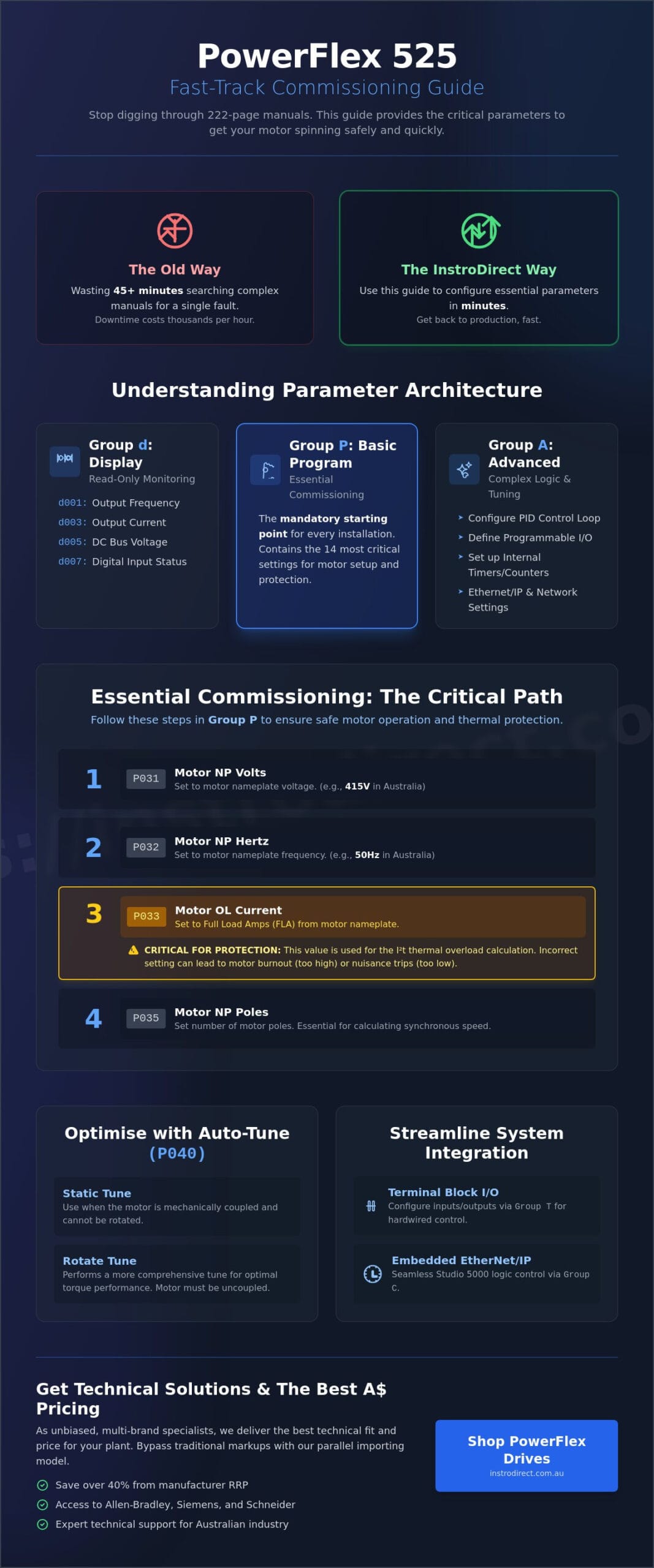
The powerflex 525 parameters guide structure is organised into three distinct groups. Group d (Display) consists of read-only parameters for monitoring. Group P (Basic Program) contains the 14 most essential settings for motor commissioning, such as nameplate data and stop modes. Group A (Advanced Program) houses over 100 parameters for complex logic and fine-tuning. For faster setups, the “AppView” tool groups parameters for specific applications like conveyors or fans. You can also use “CustomView” to create a proprietary list of frequently accessed settings, reducing navigation time during multi-drive rollouts.
The Display Group (Group d): Real-Time Monitoring
Monitoring parameters are critical for diagnostic tasks. You’ll use d001 to verify the actual output frequency and d002 to check the commanded frequency. If a discrepancy exists, it usually points to a scaling issue or a limit hit. Parameter d003 tracks output current in real-time. This is vital for protecting motors from thermal overload in heavy-duty Australian industrial environments. Use d005 to monitor the DC bus voltage; this helps identify if overvoltage trips are caused by aggressive deceleration or supply spikes. Parameters d007, d008, and d009 provide a digital map of your I/O status, allowing you to verify field wiring without opening the cabinet.
Navigating the Advanced Program Group (Group A)
Group A is where you configure the drive’s higher-level intelligence. When your application requires constant pressure or flow, you’ll access this group to set up the internal PID control loop. It’s also where you define the function of the programmable relay (A441) and opto-outputs (A444). For engineers looking to reduce PLC overhead, the PowerFlex 525 includes internal counter and timer functions within Group A. These allow for simple standalone automation logic directly on the drive. If you’re sourcing parts for a project, InstroDirect stocks Allen-Bradley PowerFlex drives and offers technical support to ensure your Group A configurations match your mechanical load requirements. We act as your primary sales arm, delivering technical depth and competitive AUD pricing across the country.
Essential Commissioning: The Basic Program Group (Group P)
Group P is the mandatory starting point for every PowerFlex 525 installation. You cannot bypass these settings if you want a functional, safe system. This group establishes the fundamental relationship between the drive hardware and the connected motor. Engineers in Australia often face harsh industrial environments where thermal protection is non-negotiable. Correctly mapping motor nameplate data ensures the drive’s internal electronic overload protection functions as intended, preventing costly rewinds or downtime. This powerflex 525 parameters guide focuses on the critical path to getting your motor spinning safely.
InstroDirect provides technical support for these units because we understand that efficiency on the factory floor starts with correct commissioning. We aren’t locked into one brand; our goal is providing the best technical solution for your specific application. Whether you are replacing an old unit or starting a new project, these Group P parameters are your first priority.
Motor Nameplate Entry (P031 – P037)Accuracy here is vital. P031 (Motor NP Volts) and P032 (Motor NP Hertz) define the V/Hz curve. In Australia, this is typically 415V at 50Hz for standard industrial motors. P033 (Motor OL Current) is the most critical setting for protection. You must set this to the Full Load Amps (FLA) rating found on the motor plate. The drive uses this value to calculate the I2t thermal model. Setting this too high risks motor burnout; setting it too low causes nuisance trips.
P035 (Motor NP Poles) is often overlooked by junior technicians. The drive needs this to calculate synchronous speed and provide accurate slip compensation. For a standard 1440 RPM motor, you would set this to 4 poles. Detailed technical data on these calculations can be found in the PowerFlex 520-Series User Manual, which serves as the definitive reference for motor control variables.
Speed Reference and Control (P041 – P053)Once the motor data is locked in, you must define how it moves. P041 (Accel Time 1) and P042 (Decel Time 1) manage the inertia of your load. Short ramp times increase mechanical stress and can lead to overvoltage trips during deceleration. P043 (Minimum Freq) and P044 (Maximum Freq) establish the safe operating window. Running a standard motor below 15Hz for extended periods without external cooling can lead to overheating due to reduced fan efficiency.
P045 (Stop Mode) dictates machinery safety and process flow. You have several options:
- Ramp to Stop: The drive controls the deceleration based on P042.
- Coast: The drive cuts power immediately, letting friction stop the load.
- DC Brake: The drive injects DC current to snap the motor to a halt, useful for high-cycle positioning.
Choosing the right hardware is just as important as the programming. If you need to source parts quickly, you can browse our range of PowerFlex drives to find the right frame size for your A$ budget. This powerflex 525 parameters guide ensures that once the hardware arrives, your commissioning process is seamless and technically sound.
Advanced Control: Terminal Blocks and Ethernet/IP Configuration
Accuracy here is vital. P031 (Motor NP Volts) and P032 (Motor NP Hertz) define the V/Hz curve. In Australia, this is typically 415V at 50Hz for standard industrial motors. P033 (Motor OL Current) is the most critical setting for protection. You must set this to the Full Load Amps (FLA) rating found on the motor plate. The drive uses this value to calculate the I2t thermal model. Setting this too high risks motor burnout; setting it too low causes nuisance trips.
P035 (Motor NP Poles) is often overlooked by junior technicians. The drive needs this to calculate synchronous speed and provide accurate slip compensation. For a standard 1440 RPM motor, you would set this to 4 poles. Detailed technical data on these calculations can be found in the PowerFlex 520-Series User Manual, which serves as the definitive reference for motor control variables.
Once the motor data is locked in, you must define how it moves. P041 (Accel Time 1) and P042 (Decel Time 1) manage the inertia of your load. Short ramp times increase mechanical stress and can lead to overvoltage trips during deceleration. P043 (Minimum Freq) and P044 (Maximum Freq) establish the safe operating window. Running a standard motor below 15Hz for extended periods without external cooling can lead to overheating due to reduced fan efficiency.
P045 (Stop Mode) dictates machinery safety and process flow. You have several options:
- Ramp to Stop: The drive controls the deceleration based on P042.
- Coast: The drive cuts power immediately, letting friction stop the load.
- DC Brake: The drive injects DC current to snap the motor to a halt, useful for high-cycle positioning.
Choosing the right hardware is just as important as the programming. If you need to source parts quickly, you can browse our range of PowerFlex drives to find the right frame size for your A$ budget. This powerflex 525 parameters guide ensures that once the hardware arrives, your commissioning process is seamless and technically sound.
Advanced Control: Terminal Blocks and Ethernet/IP Configuration
Engineers in Australia often face complex integration requirements when deploying VSDs into existing plant architectures. This powerflex 525 parameters guide focuses on the physical and digital interfaces required for robust control. Automatic Device Configuration (ADC) is a feature that enables a Logix controller to detect a replaced drive and automatically download all configuration parameters without manual intervention. This reduces downtime significantly during hardware failures. For the best availability on these units, shop the range at Instrodirect.com.au where we provide technical parts for professional installers.
Terminal Block Programming (Group t)
Hardwired I/O remains a standard for local interlocking and legacy system integration. Use parameters t062 and t063 to assign functions to the two programmable opto-outputs. These are typically set to 0 “Ready/Fault” or 2 “At Frequency” to provide feedback to a PLC or local indicator. For high-current switching, configure the Form A (t065) and Form B (t066) relay outputs. Setting t065 to 1 “Fault” ensures the relay state changes if the drive trips, which is essential for hardwired safety chains.
Precision speed control requires accurate scaling of analogue signals. Parameters t091 and t092 manage the 4-20mA or 0-10V input scaling. If your 4mA signal represents 0Hz and 20mA represents 50Hz, ensure these parameters reflect the minimum and maximum frequency limits correctly. Instrodirect.com.au is not locked into one brand; we understand that Australian engineers often mix Allen Bradley drives with various sensor brands. We provide the technical depth to ensure these components talk to each other effectively.
Network Communications (Group C)
Ethernet/IP is the primary communication method for modern Studio 5000 environments. Start with C128 (EN Addr Sel) to define how the drive acquires its identity. While BOOTP or DHCP are options, most industrial sites in Australia prefer a Static IP for consistency. Manually enter the network details in C129 through C132 to set the IP address, Subnet Mask, and Gateway. Refer to the PowerFlex 525 EtherNet/IP Adapter Manual for detailed object mapping and advanced messaging instructions.
Network reliability is critical for process continuity. C143 (Comm Loss Action) defines how the drive reacts if the Ethernet connection fails. Setting this to 0 “Fault” stops the motor immediately, while setting it to 1 “Coast to Stop” might be preferred for high-inertia loads. If you need replacement drives or communication modules, Instrodirect.com.au offers a direct, price-focused alternative to traditional distributors. We help you save more on essential automation hardware.
For multi-brand compatibility, the PowerFlex 525 also supports Modbus RTU via the RS485 port. This allows engineers to integrate the drive with various HMI and PLC brands without expensive gateways. Our team at Instrodirect.com.au supports technical automation professionals by sourcing high-quality parts at the best prices. Don’t pay full manufacture RRP when you can get amazing deals through our parallel importing model. If you can’t find what you’re looking for, contact us directly for expert assistance.
Optimising Performance: Auto-Tune and Application-Specific Parameters
Achieving peak efficiency with your drive requires more than just basic wiring. This powerflex 525 parameters guide focuses on the technical adjustments that separate a standard installation from a high-performance system. InstroDirect provides these technical insights because we understand the Australian engineering landscape. We aren’t locked into one brand, which allows us to offer unbiased advice and the best prices on Rockwell hardware through parallel importing. You save more when you buy from a supplier that prioritises your bottom line over manufacturer RRP.
The Auto-Tune Process (P040)
The Auto-Tune function (P040) is critical for Sensorless Vector Control (SVC). Without an accurate motor model, the drive cannot calculate the torque current effectively. For most Australian industrial applications, a Static Tune is the minimum requirement. It measures stator resistance without rotating the shaft. This is ideal when the motor is already coupled to a gearbox or load that’s difficult to disconnect.
- Static Tune (P040 = 1): Ensure motor nameplate data (P031 to P037) is entered correctly first. Press the start button to initiate. The drive injects current to measure winding resistance.
- Rotating Tune (P040 = 2): Use this for maximum performance. It requires the motor to be completely uncoupled. The drive spins the motor to measure leakage inductance and flux current. This is necessary to achieve 100% torque at speeds as low as 0.5 Hz.
- Troubleshooting Faults: If you see “Auto Tune Aborted,” check your motor leads. Loose connections or incorrect P035 (Motor Pole) settings are common culprits in 50Hz Australian systems.
Load and Torque Management
Fine-tuning how the drive handles physical loads prevents mechanical wear and nuisance tripping. Adjusting the PWM Frequency (A440) is a common requirement. The default is 4.0 kHz. Increasing this reduces audible motor “whine” but causes the drive to run hotter, potentially requiring derating. Decreasing it improves thermal performance in hot Australian enclosures but increases noise.
For heavy-duty starting requirements, use A530 (Boost Select). This adds a voltage offset at low frequencies to overcome static friction. If your application involves fragile conveyance, set A535 (S Curve %) to a value like 20% or 50%. This rounds off the acceleration and deceleration ramps, preventing jerky movements that damage products or mechanical linkages. Engineers can justify these precision optimisations by using our VSD ROI calculator to demonstrate energy savings and reduced mechanical fatigue.
High-cycle applications often benefit from DC Injection Braking. This stops the motor by applying a DC voltage to the windings, creating a stationary magnetic field. It’s effective for holding loads briefly or ensuring a fast, repeatable stop without a dynamic braking resistor. Set your braking time and level in parameters A415 and A416 to match your duty cycle.
InstroDirect is your pragmatic partner for industrial automation. We source the parts you need at lower pricing by bypassing traditional distribution markups. If you can’t find the specific drive or module you need on our site, ring us directly.
Sourcing PowerFlex 525 Drives and Components in Australia
Engineers in Australia often struggle with local lead times and inflated pricing for Allen-Bradley hardware. Navigating the industrial supply chain requires a pragmatic approach to procurement. While this powerflex 525 parameters guide covers the technical setup, securing the physical VFD at a competitive price is the first hurdle. Parallel importing has emerged as a vital strategy for Australian firms to bypass traditional distribution markups. It allows businesses to access the same genuine hardware while maintaining strict project budgets.
The Australian market is unique; geographical isolation often leads to “local pricing” that doesn’t align with global standards. By sourcing through alternative channels, you ensure your facility isn’t overpaying for essential infrastructure. This approach isn’t just about the initial purchase price. It’s about ensuring your spare parts inventory is robust enough to handle unexpected failures without waiting months for a shipment from overseas.
InstroDirect: Your Sales Arm for Automation
Based in Narangba, InstroDirect functions as your primary sales arm for automation. We supply genuine Rockwell Automation parts at prices that reflect global market rates rather than local RRP. Our expertise extends to identifying the exact PowerFlex 525 frame size, voltage, and filtering requirements for your application. We don’t just move boxes; we understand the technical nuances of the 25B series drives.
A major advantage for our clients is that we’re not locked into one brand. This independence allows us to provide technical advice focused solely on your system requirements. If your application demands a specific feature set that a different manufacturer handles better, we’ll tell you. We aren’t incentivised to push a single catalog. This unbiased position ensures you get the most efficient solution for your motor control needs. We stock a wide variety of Allen-Bradley PowerFlex drives to support diverse industrial environments across the country.
Fast Shipping and Local Support
Reducing downtime is our priority. We maintain ready-to-ship stock to mitigate the risks of production halts. Our parallel import model frequently saves Australian businesses over 40% on select components compared to traditional manufacturer RRP. These savings allow for better allocation of funds toward system upgrades and preventative maintenance. We understand that when a VFD fails on a critical line, every hour of lost production costs thousands of A$.
- Direct Sourcing: Genuine parts without the authorised distributor markup.
- Expert Support: Technical phone assistance to verify part numbers and compatibility.
- Rapid Dispatch: Local stock held in Narangba for fast delivery across Australia.
- Cost Efficiency: Save over 40% on select Allen-Bradley and Schneider components.
We handle the logistics and the technical vetting so you can focus on the engineering. Whether you’re referencing this powerflex 525 parameters guide for a single replacement or a full plant rollout, we provide the hardware quickly and reliably. Our goal is to be the most resourceful partner in your supply chain. Contact us today at InstroDirect for a quote on your next project. We provide the technical depth you need with the pricing the Australian market demands.
Optimise Your Drive Performance Now
Precision is non-negotiable for Australian automation engineers. This powerflex 525 parameters guide gives you the technical framework to master Group P commissioning, Ethernet/IP integration, and performance-critical auto-tuning. Getting these settings right ensures your VFD handles application-specific loads with maximum reliability. It’s about ensuring every motor control loop is tuned for the specific demands of your local infrastructure.
InstroDirect serves as your direct sales arm for high-end industrial hardware. We aren’t locked into one brand, which means we offer unbiased technical solutions tailored to your plant’s requirements rather than a single manufacturer’s agenda. You get genuine Rockwell Automation hardware and SAVE UP TO 40% FROM MANUFACTURER RRP by bypassing traditional distribution markups. Our expert Australian technical support is ready to help you source specific product codes or navigate complex configurations. We focus on value and efficiency so you can keep your projects on budget and on schedule.
Shop the PowerFlex 525 Range at InstroDirect
Ready your facility for peak performance with the best deals in the country.
Frequently Asked Questions
How do I reset a PowerFlex 525 to factory default settings?
Set parameter P053 (Reset to Defaults) to a value of 2 to perform a factory reset. This action clears all custom user configurations and returns the unit to its original out-of-the-box state. It’s a necessary step when repurposing hardware or clearing complex programming errors. Get the best deals on Allen Bradley hardware at InstroDirect. We aren’t locked into one brand, so you save over 40% compared to manufacture RRP in Australia. Shop now for immediate dispatch.
What is the difference between P046 and P047 frequency sources?
P046 (Start Source 1) sets the start command source like Keypad or Ethernet, while P047 (Speed Reference 1) sets the actual running frequency. Misconfiguring these parameters is the most common reason a drive powers up but fails to rotate the motor. This powerflex 525 parameters guide is critical for Australian engineers commissioning new systems. Need a different solution? We stock Siemens and Schneider too, giving you unbiased technical choices and lower pricing through parallel importing.
Can I run a PowerFlex 525 on single-phase power?
Yes, 110V and 230V PowerFlex 525 models run on single-phase power. You must de-rate the drive according to the technical manual because the DC bus must handle significantly higher ripple currents. Check specific part numbers on our shop page for stock availability in Australia. We offer lower pricing through parallel importing, helping you bypass traditional distribution markups. Don’t pay full manufacture RRP when you can save more with us today.
How do I fix an F004 UnderVoltage fault?
Fix an F004 UnderVoltage fault by checking the DC bus voltage levels. This error triggers when voltage drops below the minimum threshold, usually from a sag in the AC line or a blown input fuse. Measure incoming supply at terminals L1, L2, and L3 while the drive is under load to identify the drop. If your hardware has failed, contact us. We’re a no-nonsense, pragmatic supplier for Australian engineers needing fast replacements at the best prices.
What parameter controls the Ethernet IP address?
Manage the IP address using parameters C128 (Address Selection) and C129 through C132 (IP Address bytes). Set C128 to 1 (Parameters) to assign a static IP manually instead of using a DHCP server. This is standard for ControlLogix integration in Australian plants. Shop our site for amazing deals on Ethernet-ready drives. We provide technical depth, not just overview sales, to keep your facility running efficiently without being restricted to one brand.
Why does my motor hum but not turn?
Motor humming without turning usually indicates insufficient starting torque or a missing phase. Increase low-end torque via A530 (Boost Select) and verify P031 through P033 match your motor nameplate data exactly. Run a full Auto-Tune if you’re using Sensorless Vector mode. Cant find the right part for your application? Ring us directly. We offer technical expertise across all brands to solve your specific automation challenges and offer the best prices in Australia.
Leave a Comment
Your email address will not be published. Required fields are marked *